Who owes you, and who has gone quietEvery customer gets a status: OK, New, Watch, Hold or Recover, with the reason.
For businesses on SoftTrade or Tally
Know who owes you. Get paid faster.
Your SoftTrade or Tally books on your phone, updated every 15 minutes. Invoices and payment reminders reach your customers on WhatsApp.
Reads SoftTrade and TallyPrime
Read-only: never writes to your books
Updates every 15 minutes while the PC is on
Built in Jaipur for wholesale trade with dalals
What you see
Know what needs your attention today.
How fast each customer paysFast, normal, slow or very slow, from their own bills, and what cash is likely to come in over the next weeks.
Each dalal's bookBusiness brought, money stuck under him, how his parties pay.
What you owe suppliersEach supplier's open bills and when they fall due, who you are paying slower than usual, and what you paid per kg, month by month.
RevenueSales month by month and item by item, this year against last.
Expenses and moneyWhat it costs to run the business each month: rent, salary, loan interest and rebates. Plus bank, overdraft and stock. Seen only by the owner.
Worked out from your own books with statistical and logic models. They point out what needs attention; the decision stays yours.
OpenBahi
Updated 14 minutes ago
Collections
Customers who owe you
₹39.14 L124 open accounts
Due this week₹8.42 L17 customers
Overdue₹12.76 LNeeds attention
Collected this month₹18.20 LHealthy pace
CustomerOutstandingStatus
Mahesh Trading Co.Jaipur · Last paid 18 days ago₹2,84,50011 days late
Shree Balaji FoodsKota · Last paid 6 days ago₹1,62,2404 days late
Goyal EnterprisesAjmer · Last paid today₹96,880On track
Dalals
Business each broker brought in this year
₹1.09 CrSales via 14 dalals this FY
Money stuck under dalals₹27.40 L70% of all dues
Overdue under dalals₹9.85 LAcross 9 dalals
Direct sales, no dalal₹44.30 L29% of sales
DalalOutstandingOverdue
DL Ramesh23 parties · ₹31.6 L sales this FY₹8,64,200₹2,18,000
DL Suresh Kumar17 parties · ₹23.8 L sales this FY₹6,05,900₹1,02,400
DL Gopal Das12 parties · ₹17.2 L sales this FY₹4,31,750Nothing late
Day Book
Today's invoices and receipts
₹1.24 L7 sales invoices today
Received today₹1.08 L4 payments
Invoice PDFs sent6 of 71 has no WhatsApp number
Purchases today₹84,5002 bills
EntryAmountStatus
Shree Balaji FoodsSales invoice SL-2481 · 11:42 am₹38,640PDF sent
Goyal EnterprisesReceipt RC-0917 · Bank · 12:05 pm₹42,000Received
Sharma General StoreSales invoice SL-2482 · 12:31 pm₹16,280No number
Clients
Who is buying, and who has gone quiet
286Customers billed this FY
Bought this month131customers
Gone quiet18Regulars, no bill in 90 days
New this year23First bill after 1 April
CustomerOutstandingActivity
Mahesh Trading Co.Jaipur · Last invoice 3 days ago₹2,84,500Buying
Kothari ProvisionsBhilwara · Last invoice 104 days ago₹58,300Gone quiet
Goyal EnterprisesAjmer · Last invoice 9 days ago₹96,880Buying
Revenue
This year against the same months last year
+12.3%₹1.53 Cr vs ₹1.36 Cr
Sales this FY so far₹1.53 CrApril to today
Same period last year₹1.36 CrApril to this date
Bills this month21214 new customers
Apr
May
Jun
Jul
Aug
Sep
Top item this FYSalesShare
Refined soybean oil, 15 L tin₹34.6 L23%
Sugar M-30, 50 kg₹27.1 L18%
Chana dal, 30 kg₹19.4 L13%
Screens use sample figures.
WhatsApp
Invoice made. Customer informed.
The invoice PDF goes to the customer's confirmed WhatsApp number after every sync, with the e-invoice QR when available.
Overdue reminders carry the current statement. You choose which customers, and whether once, every 7 days, every 15 days or monthly.
Safeguards stay on: only confirmed numbers, no Sundays, paused after a payment, stopped when nothing is overdue.
How it starts
Three steps, done once.
01
Create your account with email (or Google).
02
Generate a setup code from your profile and enter it in the small Windows app on the PC that runs SoftTrade or Tally.
03
Your books sync in the background and the dashboard opens on your phone.
Your books stay untouched: OpenBahi reads a copy. Each login reaches only its own companies.
Prefer to talk first? Request a callback.
Common questions
Before you connect.
No. For SoftTrade it copies the required files into a temporary folder and reads that copy. For TallyPrime it reads through Tally's own XML/ODBC port while Tally is open. It never writes to either.
The small Windows app checks every 15 minutes while the PC is on (for Tally, while Tally is open). When the books have changed, the dashboard is rebuilt. If the PC was off, it catches up when switched on.
Yes. The dashboard works in any phone or computer browser and can be added to your phone's home screen.
After each sync, new invoice PDFs go to the customer's confirmed WhatsApp number; if the number is not confirmed, the invoice comes to you to check and forward. Reminders are off by default: you pick the customers and choose once overdue, every 7 days, every 15 days or monthly. Each reminder carries the current statement, skips Sundays, pauses after a payment and stops when nothing is overdue. Dalals can get reminders for their parties too.
Yes. One login can hold several companies. Several companies in one Tally can each have their own dashboard from one install.
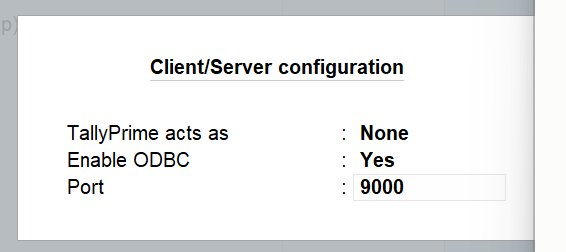
Once, in TallyPrime: Gateway of Tally > F1 (Help) > Settings > Connectivity > Client/Server configuration. Set Enable ODBC to Yes and Port to 9000, and leave “TallyPrime acts as” on None. Dalal figures in Tally depend on the broker name being entered on invoices.